
5 Unique Tricks to Make Your Facebook Profile Attractive

Thinking about how you can make your Facebook profile attractive and unique, just as you are? It is the first place people often visit when they search for your name. If it's clean and thoughtful, it can influence how others perceive you.
According to Wikipedia, over two billion people use Facebook every month. Many users often visit profiles for personal or professional reasons. So if your profile is well presented, it can leave a positive impact on the visitor. The visitor could be a potential client, an old friend, or someone deciding whether to accept your friend request. A clean and thoughtful profile quietly tells people who you are without saying much.
But how can you make your Facebook profile attractive? This is what I’ll help you learn in this blog. I’ll share 5 unique tips to help make your profile stand out.
How to Make Your Facebook Profile More Attractive
The following are 5 tricks to make your profile unique and more attractive.
- Treat Your Profile Photo Like a Personal Brand Shot
Your profile picture is the most visible part of your Facebook account. It appears in multiple places, including comments, messages, and search results. So, it needs to be carefully chosen.
Select a clear photo where your face is visible and recognizable. For this, take a photo in natural light to make your facial features prominent. Don't get too far or too close to the camera. Your face should cover the center of the frame, but not so much that it feels tight.
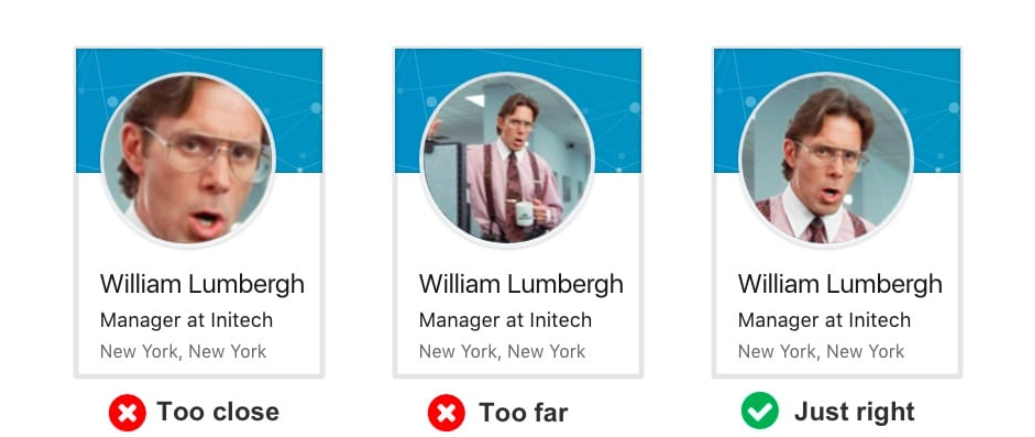
Image Source - Orbit Media
If your face is too far, people won't be able recognize you. This makes you look less approachable. Also, dress simply and neatly, and if it’s personal, just make sure it reflects your personality.
A good approach is that if someone sees your photo in a comment, they should feel comfortable visiting your profile.
- Use a Cover Photo That Tells a Story
Many people upload a random picture as their cover photo and then just completely forget about it. But it's a missed opportunity. Your cover photo covers most of the area of your profile display and tells a lot about you. It can showcase your hobbies, work, mindset, or even a quiet aesthetic you like.
For example, writers often use minimal designs with quotes. Travelers may choose a favorite location. A mountain climber can put their favorite landscape in the background, as shown in the image.

Image Source - Orbit Media
From the image above, you can easily get a sense of the personality and interests of the mountain climber just by looking at his cover photo. It makes your profile not just attractive but also gives a quick insight into who you are beyond just your profile picture.
- Format Your Bio for Clarity
The bio gives an idea of who you are. Many people leave it empty or stuff it with unnecessary words or emojis. But, this doesn't help. Instead, keep it clean and easy to scan. This section is short, so formatting matters. Write two or three clear lines that show who you are and what others can expect when they connect with you. Treat it like a friendly intro, not a resume.
You can also use line breaks creatively in your bio to make the text easy to read. But formatting does not always stay the same. When you update your profile, add captions, or edit text later, the spacing and line breaks can sometimes shift. This can make a clean bio look cluttered or hard to read.
To prevent this issue, you can add invisible text in your bio to maintain proper spacing between lines. Although invisible characters look empty, they still hold space. They help keep the formatting intact and maintain gaps between lines even when Facebook tries to compress the text automatically.
The image above shows a Facebook bio with invisible text added. You cannot see anything where the arrows are, but there are actually Unicode characters present. These are often referred to as hidden characters. Facebook’s algorithm recognizes them as real characters, but they are not visible to humans. They take up space and help keep the spacing in your bio consistent. This is a simple trick to make your bio look clean and organized without much effort.
- Pin a Post That Truly Reflects You
Facebook allows you to pin a post at the top of your profile. This feature is not so popular among users, but it is incredibly powerful.
Select a post that represents you or shows your latest achievement. It could also be a thoughtful opinion or a helpful tip. When someone visits your profile, it is often the first content they read.

The image above shows the pinned achievement post by a user who just finished setting up his smart home setup. Pinning such posts gives the visitors a sense of your personality and accomplishments. However, avoid pinning something overly negative or too old. Also, update your pinned post every few months so that your Facebook profile looks active and fresh.
- Clean Up Your Public Activity and About Section
Keep your Facebook timeline clean and updated by removing irrelevant posts or old posts. Take some time to review your uploads, tagged photos, and shared posts. Delete or change the privacy of the posts that no longer represent you. This is especially important if you use Facebook for professional connections.
Also, give a brief look at your About section. If anything has changed, like your workplace, education, and city, update them. A clean public activity log and an updated About section make your Facebook profile feel intentional and more attractive overall.
Summing Up
To make your Facebook profile attractive, you are not required to make dramatic changes. Work on small details that add value. Upload a clear profile picture with your face aligned in the center of the frame. Also, add a meaningful cover photo. Don’t leave your bio empty. Instead, add a bio that truly represents you.
Give a brief look at your uploads or shared posts and do a bit of cleanup. This can improve how people perceive your profile. I’ve shared 5 unique yet simple tricks in this blog. With these tricks combined, your Facebook profile starts to look more polished, personal, and attractive without trying too hard.
Join 200,000+ Sellers Growing with Kua.ai

You may also interested...
Convert More with Data: Social Proof, Case Studies, and Martech Insights

Why the Same Thinking That Wins Deals Also Wins Game Night
Using Content to Build Trust, Traffic, and Sales in Ecommerce

AI for Multichannel Selling


